
How Law Firms Can Rank #1 with Smart Content Marketing in 2026
Stop losing clients to firms that rank higher. With the right content strategy, your law firm can stand out, earn trust, and bring in consistent, qualified leads.
Summarize with AI





Key Takeaways
- Why Content Marketing Is Important for Your Law Firm
- How the Process Should Be Done
- New 2026 Tactics: AEO, GEO, and More
- A Free 4-Week Plan for Your Blog Strategy
Struggling to Rank or Get Leads Online?
Still stuck on page 3 of Google? You're not just missing traffic, you're losing clients.
You’re not alone. In 2026, digital competition is tougher than ever. Most potential clients won't find you if you're not on page 1.
The opportunity? Content marketing isn’t just a buzzword; it’s the most effective way to boost your rankings and content strategy. Build credibility and attract high-quality leads.
If you’ve been looking for a way to turn your law firm’s content into real client inquiries, this is where you’ll find your solution.
Why This Guide Matters
This guide is your roadmap to smarter, more profitable marketing. Whether you're a solo attorney or managing a full-scale firm, or a personal injury lawyer, you'll discover proven strategies to:
- Rank higher in search results
- Build lasting client trust
- Convert traffic into real consultations
So, stay tuned with us to see the mystery process you can dominate digital marketing with the help of content marketing.
Content Marketing: What Every Law Firm Should Know
What Is Content Marketing?
It’s more than just blog posts. Content marketing is the intentional creation and sharing of valuable information to attract, educate, and convert prospective clients.
Did you know? 70% of people would rather learn about a law firm through articles than ads.
What Makes It Work?
- Consistency: One blog won’t cut it. You need a content system.
- Relevance: Each piece must connect to your client’s real concerns.
- Strategy: Everything should serve your business and SEO goals.
LegalPeel simplifies it all with done-for-you planning, writing, and promotion.
How Content Marketing Fits Into Digital Marketing for Law Firms
Digital marketing is the umbrella; content marketing is the engine.
While digital marketing includes SEO, paid ads, social media, and email campaigns, none of those work effectively without strong content at the core.
Here’s how they connect:
- SEO & Content → Search engines reward law firms that consistently publish optimized, without content, SEO has nothing to rank.
- Paid Ads & Content → Ads get the click, but the content on your landing page is what convinces people to book a consultation.
- Social Media & Content → Posts, articles, and videos keep your firm top-of-mind and shareable.
- Email Marketing & Content → Newsletters, guides, and updates nurture leads until they’re ready to hire.
Tips: Grow Your Firm’s Leads — See How
Why Content Marketing is the Top Growth Strategy for Law Firms
Fact: 70% of legal clients research online before ever making contact.
You're losing valuable leads if your firm isn’t visible in that journey.
Here’s how content marketing helps:
- Boosts visibility on search engine optimization
- Builds trust with prospective clients
- Converts website visitors into consultations
Firms working with LegalPeel see 3x more organic leads in just 6 months.
[[inner-cta]]
How Google Ranks Legal Content in 2026

Google now rewards content that meets its E-E-A-T criteria:
- Experience
- Expertise
- Authoritativeness
- Trustworthiness
This means your content must be:
- Legally accurate
- SEO-optimized
- Engaging and easy to understand
- search engine rankings
So, create your content that performs in search and resonates with readers.
Why Smart Law Firms Are Going All-In on Content
Real Benefits of Content Marketing
- More Leads: Generate 3x more leads at 62% lower cost than traditional methods.
- Better SEO: Rank higher on Google and get discovered by people actively searching.
- Stronger Brand Trust: Become the attorney people recognize and respect.
- Increased Conversions: Educated clients are more likely to call, click, and commit.
What Types of SEO Content Work for Law Firms?
Here’s what generates real results:
- Blog posts answering client FAQs
- SEO-optimized practice area pages
- Long-form legal services guides
- Attorney Q&A videos turned into blogs
- Google Business Profile content for local SEO
What do you need an Agency for?
An agency doesn’t just write blogs; it delivers a full-stack content system tailored for law firms. That includes:
- SEO-optimized practice area pages
- Educational blog posts & legal guides
- Google Business Profile content
- Attorney Q&A videos turned into articles
- Strategic content calendars & planning
All designed to drive organic traffic and convert visitors into real client inquiries. If you need any suggetion are 24/7 open for you.
4-Week Content Calendar for Law Firms (Ready-to-Publish)
Why Leading Law Firms Choose Agency For Content Marketing
Proven Strategy That Delivers
We don’t just create content, we build targeted strategies designed to drive traffic, generate qualified leads, and grow your caseload. Every word we write serves a purpose.
Fully Managed, Hassle-Free Execution
From content planning to publishing, we handle it all. Stay focused on your clients, we’ll take care of the marketing that brings them in.
Legally Accurate, Professionally Written
Our team blends legal knowledge with digital marketing expertise to produce compliant, credible, and conversion-ready content. No fluff, no risk.
Tailored Content Calendars Built for Growth
We map out a strategic publishing plan aligned with your practice areas, SEO goals, and client acquisition strategy, so you never miss an opportunity to get found.
Real Results. Clear Reporting.
Track exactly how your content is performing. We provide simple, insightful reporting that shows your growth in rankings, traffic, and consultation.
Powerful Content Writing for Law Firms That Converts
Effective content writing is key to building a strong online presence and connecting with your target audience. For law firms, publishing high-quality content, from insightful blog posts and engaging landing pages to persuasive case studies, helps establish trust and authority.
Thoughtful keyword research ensures your message resonates, while well-crafted stories can turn a visitor into a new client. Pair this with compelling social media posts and data-backed insights from analytics, and your marketing efforts become far more impactful.
Great content supports your visibility in Google Search, enhances your local search reach, and complements your technical SEO strategy to drive meaningful results.
Ready to turn your law firm’s content into a client-generating machine?
[[last-cta]]
Frequently Asked Questions on Content Marketing
Have a project in mind?
Got a Project to discuss?
Explore Related Journals
Would ChatGPT recommend your firm right now if someone asked?
Go test it. Ask ChatGPT, "Who's a good personal injury lawyer in [your city]?" Most solo and small PI firms get the same answer. A competitor's name they don't even think is better than them.
Here's the number that should worry you. 41.9% of consumers now say they'd use ChatGPT to research an attorney, up from just 9% in 2023. That's nearly 5x growth in three years. And 50.1% would use at least one AI answer engine—ChatGPT, Gemini, Claude, Perplexity, or Grok—somewhere in their search for a lawyer.
So this isn't a future problem. It's already happening in your market this week to someone searching for exactly the kind of case you handle.
Let's get into what's actually going on, why it can feel unfair if you've been in practice for years, and what actually moves the needle.
How Does ChatGPT Choose Which Personal Injury Lawyers to Recommend?
ChatGPT recommends and cites the PI lawyers' websites mainly in two ways:
First, training data: what ChatGPT already knows about your firm from what's been written about you online, up to its last update.
Second, live web search. When ChatGPT actually searches the web for a current answer, it's pulling primarily from Bing's index.
That means Google and Bing, both search engines, need to pay attention to ranking on ChatGPT and AI.
One analysis of ChatGPT's live citations found 87% matched Bing's top organic results for the same query.
So if your PI firm ranks well on Google but has never touched Bing Webmaster Tools, that gap is probably part of why you're invisible in AI.
Beyond the index, ChatGPT is also weighing what looks trustworthy.
Real attorney bios. Specific practice area pages. Reviews that read as if an actual client wrote them. Directory listings that match across Avvo, Justia, and Martindale.
This is the same E-E-A-T signal set Google's leaned on for years, just applied by a different kind of engine now.
Can ChatGPT Actually Recommend a Personal Injury Lawyer?
Yes. And people are already asking ChatGPT when they urgently need to call a PI lawyer.
One Reddit thread put it plainly. Someone needed a family law attorney, skipped Google entirely, and asked ChatGPT instead. Got three names back with full contact details, experiences, and website links for each.
So, legal leads are smarter nowadays. They pick up the phone, go to ChatGPT, and type, “I’ve had a car accident in Atlanta. Please give me the best PI lawyers who have specialized in car accidents near me.”
And ChatGPT cited the website of the PI firm that has listed car accidents in Atlanta and those plus experiences on their website, directory, and social media presence. If your website is missing that strategy, you're losing potential clients. So, go back to your site and note what needs to be improved for AI visibility.
Why My Established PI Firms Are Losing to Newer Firms in AI Search
You may wonder why your 15-year-established PI firm is not showing in AI, but a new solo law firm website gets cited! How?
This is the one that stings the most. And it shows up constantly online.
One managing partner at a firm with 30 years in litigation described checking ChatGPT himself after a client mentioned she'd searched there first and hadn't found his firm.
Solo law firms only three or four years into practice showed up ahead of him instead.
Here's the reason behind it:
AI can't read your track record
No matter how experienced your firm is in similar practice areas, until your website, social media, and directory listing structured data are pulling data to AI, it can't make the advantages cited in AI.
A newer firm that's invested in those assets simply looks more credible to an AI than an established firm that hasn't touched its site in five years.
Your website UX structure is outdated
It's 2026, but your site still brings visitors into a 10-year-old design. Stock photos, cluttered navigation, buried practice areas, and outdated layouts make it harder for both users and AI systems to understand what your firm actually does.
Your experience may be impressive, but if visitors have to dig through your website to find your practice areas, case results, attorney credentials, or reviews, you're making that credibility harder to discover.
You don't have SEO and AI-optimized sites
The good part. That gap is more fixable for established firms than it looks. You already have the verdicts, the peer recognition, and the client history newer firms don't have yet. The work is translating that into a format AI can actually read. Structured practice area pages that answer specific questions. Third-party mentions and citations. Reviews that reflect your actual case work, not just a star rating.
None of that requires a full rebuild. It requires the content on your site to catch up to what your firm has already done.
Your firm's authority isn't being turned into digital proof
This is where established firms have a major advantage.
You already have the verdicts, settlements, peer recognition, attorney experience, client history, and years of casework that newer firms are still building.
The problem is that much of that authority may be sitting offline—or buried somewhere on your website.
Turn those credentials into useful, structured content: detailed case results, attorney bios, practice-area expertise, FAQs, awards, reviews, and third-party mentions. The goal isn't to make your firm look more experienced. It's to make the experience you already have easier for search engines and AI systems to understand.
AI visibility isn't about being the newest firm
A newer firm appearing in ChatGPT doesn't automatically mean it's better than yours.
It often means its digital presence is easier for AI systems to interpret.
That gap is more fixable for established firms than it looks. You already have the hard part: years of real legal experience and results.
Now your law firm website needs to communicate that authority as clearly online as your firm demonstrates it offline.
[[inner-cta]]
Why ChatGPT, Claude, and Google AI Mode Recommend Different Firms
Here's a number that changes how you should think about this entire problem.
One study ran 3,200 "recommend a lawyer" prompts across ChatGPT, Claude, and Google AI Mode in the top 100 US cities. On 83% of those prompts, the three platforms had zero law firms in common.
Each platform also leans on a different directory almost entirely. Claude cited Avvo in 87.1% of its answers and Martindale in 55.5%. Google AI Mode barely touched either one but pulled Super Lawyers into 62.8% of its answers instead. Reddit and Yelp showed up regularly in Google AI Mode and never once in the chat assistants.
Practice area matters here too. Corporate law hit a 45.2% three-way agreement across platforms. Estate planning hit 0%. Across 100 cities, the three platforms never once converged on a shared firm for that practice area.What this means for a personal injury AI strategy. You can't optimize for ChatGPT alone and call it AI search visibility. Getting recommended in one engine says almost nothing about whether you'll get recommended in another. Your directory presence has to be broad, not concentrated wherever you happened to check first.
Read out the full version of this as a 15-point law firm AEO checklist if you want the complete breakdown.
How Can Personal Injury Law Firms Improve AI Search Visibility?
Here are the signals that can make your firm easier for AI search systems to understand:
Structured Practice Area Pages
Create dedicated pages for car accidents, truck accidents, slip and falls, wrongful death, and other PI services. Each page should answer the specific questions a potential client in that situation would actually ask.
Don't just list the service. Explain who the service is for, what the client should know, what steps they can take, and how your firm helps.
This makes your law firm website easier for Google, Bing, and AI systems to understand and connect with relevant searches.
Direct Answers in the Hero Section
The first few sentences on your page should quickly tell visitors and AI who you serve and why they should consider your firm.
Instead of:
"Welcome to our award-winning law firm, where clients always come first."
Say something more specific:
"We help injured people in Atlanta pursue compensation after car accidents, truck crashes, and serious personal injuries."
Don't bury the answer under fluff. Keep it direct, natural, and easy to understand so AI can extract the key information when someone asks a related legal question.
Consistent Directory Listings
Your firm's information shouldn't look different everywhere online.
Maintain consistent NAP (name, address, and phone number) information across platforms such as Avvo, Justia, Martindale-Hubbell, and Super Lawyers.
These third-party profiles can reinforce your firm's identity, location, practice areas, and authority across the web. When those signals are consistent, search engines and AI systems have an easier time connecting them to the same law firm.
Reviews AI Can Actually Parse
Many personal injury attorneys collect reviews but don't think much about what those reviews actually say.
A review that simply says "Great lawyer!" provides less useful context than one that naturally describes the type of case the attorney handled and the client's experience.
Encourage genuine clients to leave honest reviews on relevant platforms such as Google, Avvo, or Yelp. Don't manufacture or manipulate reviews. Instead, make it easy for satisfied clients to share their real experience.
Those third-party mentions can add another layer of credibility to your firm's online presence.
A Live Presence in Bing
Don't ignore Bing when you're thinking about AI search.
Verify your website in Bing Webmaster Tools, submit your sitemap, and check that important pages are being crawled and indexed.
It takes relatively little effort, but it gives you another way to make your firm's content discoverable across Microsoft's search ecosystem and AI-powered experiences.
Clear Attorney Expertise Signals
AI needs more than a firm's name to understand why that firm should be relevant to a specific legal question.
Make your attorneys' experience easy to find. Include detailed attorney bios, years of practice, specific practice areas, bar admissions, professional memberships, awards, notable cases where appropriate, and links to credible third-party profiles.
If your firm has handled thousands of personal injury cases, don't make visitors hunt for that information. Put the evidence of your expertise where both people and search systems can find it.
Check Your Robots.txt File
Your robots.txt file tells search engines and AI crawlers which parts of your website they can access. If important AI crawlers such as ChatGPT-User, PerplexityBot, or ClaudeBot are blocked, those systems may have difficulty discovering or retrieving your firm's content. Before investing in AI SEO, check your robots.txt and make sure you aren't accidentally preventing relevant crawlers from accessing your important practice area, attorney, and informational pages.
Add Legal Service and Attorney Schema
Schema markup gives search engines structured information about your law firm and attorneys. Add a LegalService schema to relevant firm/service pages and an Attorney schema to attorney profile pages to clearly communicate details such as your firm's name, location, practice areas, attorney names, credentials, and contact information. This doesn't guarantee that ChatGPT will cite your firm, but it can make your website's information easier for search systems to interpret and connect with relevant legal queries.
Content That Answers Real Client Questions
Your potential clients aren't searching only for "personal injury lawyer."
They're asking questions like
- "How long do I have to file a car accident claim?"
- "What should I do after a truck accident?"
- "Can I sue if the other driver was uninsured?"
- "How much is my injury claim worth?"
Build content that answers these questions clearly and accurately.
The goal isn't to write content simply because a keyword has search volume. Answer the questions your ideal clients are already asking.
When your website consistently demonstrates relevant expertise, it gives search engines and AI systems more context to understand when your firm is a useful answer.
We've written a deeper breakdown of the strategy behind this if you want to know how to rank your law firm in ChatGPT and AI search.
Final Words
So, would ChatGPT actually recommend your firm today?
If you're not sure, that's the honest starting point. Most solo and small PI firms haven't checked, and the ones that have are usually surprised by who's showing up instead of them.
None of this requires abandoning your reputation or your track record. It requires putting it somewhere AI can actually read it.
At LegalPeel, this is what our SEO and AEO services are built around for personal injury firms specifically. Audit first, fix the visibility gaps, then track what's actually working across every AI engine.
Get your free AI search audit.
[[last-cta]]
.webp)
Personal injury leads can cost $50 for a shared web form to over $4,000 for a live-transfer call.
Case type, market, lead source, exclusivity, qualification, and how fresh the inquiry is when it lands in your inbox actually drive the cost.
Here's the part most pricing guides skip. Cost per signed case is. A $400 lead that converts is cheaper than a $100 lead that never picks up the phone.
In this article, we'll give you a transparent, detailed pricing breakdown so your investment goes further, from PI lead cost to winning cases. Keep reading.
Average Cost of Personal Injury Leads
PI leads can cost anywhere from $100 to $600, depending on several factors.
For example, a personal injury attorney targeting car accident leads in a competitive market like Atlanta may pay twice as much as an attorney targeting leads in a smaller market like Macon, where there are typically fewer law firms bidding for the same potential clients.
[[inner-cta]]
Factors that Determine the Cost of a PI Lead?
The eight most underrated factors that determine how much you should charge for getting personal injury leads. Here's the list
- Case value — the higher the expected settlement, the more a lead is worth bidding on
- Case type—auto accidents are common and cheaper; trucking and medical malpractice are rare and expensive
- Location—competitive metros like LA, Chicago, and Atlanta push prices toward the top of the range
- Competition — how many firms are bidding for the same keyword or the same lead
- Search intent—someone typing "car accident lawyer near me" costs more than someone reading a general injury article
- Exclusivity — Whether the leads are sold to one firm or several.
- Qualification requirements — the more screening built in, the higher the price
- Lead freshness—real-time is better than aged.
Personal Injury Lead Pricing by Lead Generation Channel
Law firm lead generation services mainly focus on two ways. One is organic marketing, and the second is paid marketing. Well, the system of generating legal leads is crucial to know before you invest money.
SEO-Generated Personal Injury Leads
Organic search is the slow-build option but a profitable one. And SEO and AEO services for law firms make that lead gen more successful.
Website, blog, and SEO are the #1 ROI-generating channel according to 27% of marketers.
Ranking for terms like "personal injury lawyer [city]" takes ongoing content and local SEO work, and it doesn't produce leads on day one.
But once a page ranks, the leads it generates keep coming without an added cost per click.
Firms that invest early in SEO and web design packages built around lead generation tend to end up with the lowest long-run cost per lead of any channel. Even though the upfront investment is higher than turning on an ad campaign.
Quick win: LegalPeel helped Dorsel Law combine a conversion-focused website, SEO, and lead generation to generate 9 successful clients within just 2 months.
Google Ads and PPC Leads
PPC gets you in front of high-intent searchers immediately, and it costs accordingly.
Personal injury Cost-per-click runs 70–250 in most markets, and competitive terms in major metros can exceed $500 per click.
Well, here are the things lawyers can make mistakes about. The reminder is that not every click becomes a lead, and not every lead converts. So your real cost per lead sits well above the CPC once you account for landing page conversion rates.
Local Services Ads Leads
Google's Local Services Ads show up above traditional search ads and charge per lead instead of per click.
Personal injury lawyers mainly make profit from this LSA service to get maximum leads.
Typically, LSA-generated personal injury leads cost 250–500 per call. The upside is you only pay when someone actually calls or messages, not for every click that goes nowhere.
Social Media Leads
Facebook and Instagram lead ads are cheaper per click than Google Ads, but the audience isn't actively searching for an attorney. They're scrolling.
That gap shows up in lower intent and lower conversion, which is why social leads tend to cost less upfront and more in follow-up effort to actually sign.
Purchased Personal Injury Leads
Third-party lead providers run their own ad campaigns, capture the inquiry, and sell it to one or more law firms.
This is where most of the "how much does a PI lead cost" pricing you'll find online comes from, and it's the fastest way to add volume without building your own acquisition system.
Live-Transfer Personal Injury Leads
A live transfer is a pre-screened prospect connected to your intake team by phone, in real time.
It's the most expensive model, often 1,000–4,500 depending on case type, because it removes the speed-to-lead problem entirely. The trade-off firms run into: you pay for the transfer whether or not the case actually signs.
CPL vs. Cost Per Signed Case: Which Metric Matters More?
What Is CPL?
Cost per lead is exactly what it sounds like: total spend divided by the number of leads generated. It's the number every vendor quotes you, and it's the least useful number for deciding whether a channel is actually working.
What Is Cost Per Signed Case?
Cost per signed case is total spend divided by the number of leads that actually became clients. It accounts for conversion rate, not just sticker price, and it's the number that tells you whether your marketing dollars are turning into revenue.
Example: A $100 Lead vs. a $300 Lead
The cheaper lead looks like the better deal until you run the math past the purchase price. This is a hypothetical example, but the pattern shows up consistently in real firm data: exclusivity and qualification usually win on cost per signed case even when they lose on cost per lead.
How to Calculate Your Personal Injury Lead ROI
The formula is simple:
Total lead spend ÷ number of signed cases = cost per signed case
Then compare that number against your average case value. A reasonable target is keeping cost per signed case under roughly 10–15% of what you expect the case to settle for.
If a case is worth $20,000 in fees, spending $2,000–$3,000 to acquire it is defensible. Spending $8,000 isn't, no matter how cheap the individual leads looked on the invoice.
Buying Personal Injury Leads vs. Generating Your Own Leads
Advantages of Buying Personal Injury Leads
- Faster pipeline with no ramp-up period
- Less internal marketing work to manage
- Predictable lead volume month to month
- Access to acquisition systems already built and tested
Disadvantages of Buying Leads
- Ongoing cost that never goes away
- Dependency on a provider's traffic quality and screening
- Shared-lead competition eating into conversion rates
- Quality that varies by vendor and by month
Advantages of Building Your Own Lead Generation System
- Full control over targeting, qualification, and follow-up
- Long-term SEO value that compounds instead of resetting every month
- Brand ownership instead of borrowed traffic
- First-party data on what's actually converting
- Lower acquisition cost over time as organic channels mature
Which Model Is Right for Your Law Firm?
If you need case volume this quarter, buying leads fills the gap faster than any organic system can ramp up. If you're building for the next three to five years, a firm-owned system through SEO, web design, and a real lead-generation infrastructure is the one that keeps paying off after you stop spending on it.
Most solo and small PI firms end up running both: purchased leads for near-term volume while the organic pipeline builds underneath them.
How LegalPeel Helps Personal Injury Law Firms Generate Leads
Here’s how LegalPeel makes the lead generation pipeline more valuable than so-called lead gen vendors by selling cheap PI leads
Step 1: Identify the Ideal Personal Injury Client
We ask you several questions, such as about your firm, goals, lead source (you are interested in), your income streams, and your firm's capacity to handle cases per month.
Then we define case type, injury severity, and geography before any traffic is bought, or every dollar spent afterwards is aimed at the wrong audience.
Step 2: Build the Acquisition Strategy
Next, we make and refine the lead gen process exclusively for your firm. For example, SEO, PPC, LSAs, email campaigns, or social media—usually some combination—are chosen based on budget, timeline, and how competitive the target market is.
Step 3: Make sure the Acquisition System is Fully Ready
We again refine your lead tracking and automation system [or even build it], like website landing pages, contact forms, social media profiles, and local pages where leads will land and make decisions. So, when potential legal leads came, you were confident to make a call to your firm as their first choice.
Note: 78% of businesses lose customers due to no lead tracking system. Unlike other law firm lead generation vendors, we make sure your every single dollar pays for the highest-chance leads, not any waste.
Step 4: Generate Qualified Traffic
We either run ads and bring in visitors or build an organic marketing pipeline for getting leads who are actually searching for an attorney, not just anyone reading about accidents.
Step 5: Capture the Lead
A landing page or form converts that visitor into contact information. This step alone is where a lot of paid traffic gets wasted, since a slow or confusing landing page kills conversion before the lead ever reaches intake.
Monitor and analyze the automated lead tracking system with continuous and transparent reporting.
Tips: We design and build lead-generating legal tools for law firms across the U.S. If you want your firm to have a free FOIA generator, intake form wizard, or automated legal PDFs, we can build it under your brand.
Step 6: Qualify the Inquiry
We help establish qualification criteria to filter out inquiries that don't fit your firm's requirements, such as the wrong practice area, someone who is already represented, or a case outside the applicable statute of limitations.
This helps your intake team spend more time on opportunities that have a realistic chance of becoming signed cases.
Step 7: Route the Lead to Your Law Firm
Once a lead is captured and qualified, it needs to reach your team quickly.
Depending on your setup, leads can be routed through phone, SMS, email, or CRM integrations, helping your intake team respond while the potential client is still actively looking for legal help.
Step 8: Optimize for Better Cost Per Signed Case
We continuously evaluate campaign and case-level performance, cut what isn't working, and shift resources toward the channels and case types producing signed cases at the best cost per acquisition.
That's the difference between simply buying personal injury leads and building a personal injury client acquisition system.
[[last-cta]]
Is Buying Personal Injury Leads Worth It in 2026?
Yes, but not every personal injury lead is worth buying. When Buying PI Leads Makes Sense
Buying leads can make sense when your firm:
- Needs cases faster than SEO can produce them
- Has available intake capacity
- Is entering a new geographic market
- Wants to test a new practice area or case type
- Has a reliable follow-up and intake process
- Can track leads through consultation and signed case
Buying leads can solve an immediate volume gap, but it doesn't build an asset your firm owns. LegalPeel's personal injury marketing services focus on building a lead-generation system around your own website, search visibility, landing pages, lead capture, qualification, and intake.
Instead of optimizing for cheap leads, we track cost per signed case and identify what's actually driving revenue. If your website is hurting conversion, that's often the first thing to fix before increasing traffic.
Want a more predictable way to generate personal injury cases? Talk to LegalPeel about building a system around your firm's market, practice area, and growth goals.
.webp)
There are more than 1.3 million lawyers in the United States. According to the American Bar Association's 2025 Profile of the Legal Profession, that number just climbed to 1.37 million, up from 1.35 million the year before. The first increase since 2020.
That doesn't mean all 1.37 million lawyers are competing for the same personal injury client in the same city. But it does mean a generic law firm website isn't much of a differentiator anymore. Blue color scheme, stock photo of a gavel, and aggressive advocates in the hero. That template has been copied so many times it's basically invisible now.
The firms winning consultations in 2026 aren't winning because of animations or a bigger hero image.
Good personal injury lawyer website design isn't about looking impressive. It's about removing every reason a hurt visitor has to leave. We pulled real examples to show what that actually looks like.
What Makes a Personal Injury Law Firm Website Stand Out?
Look at any list of the best personal injury attorney website designs. Good personal injury attorney website design isn't about more features; it's about the right handful done well.
Problem-Focused Messaging
A hurt visitor doesn't want a law firm history lesson. They want to know two things fast. Can this firm help me? What do I do next? The sites that convert answer all in the first screen, before any scrolling.
Strong Above-the-Fold CTA
"Contact Us" is weak. It doesn't tell a visitor what happens after they click. "Free Case Evaluation" or "What's My Case Worth?" does more work because it names the outcome instead of the action. Before designing your PI law firm, get the proven 7 CTAs for law firms that convert.
Trust Signals That Reduce Hesitation
Bar association badges matter less than most firms think. What actually reduces hesitation is specificity. Real verdict numbers. Named attorneys. A process the visitor can picture before they call.
Case Results and Social Proof
Numbers without context are just numbers. The firms that do this well attach a sentence of what happened, not just a dollar figure floating on the page.
Attorney Branding That Feels Human
Stock photos of handshakes and gavels don't build trust. A real photo, a real name, a modern law firm logo, and a sentence in the attorney's own voice do more in three seconds than a page of credentials.
Mobile-First UX
Most PI searches happen on a phone, often right after an accident. That means tap-to-call has to be visible without scrolling, and forms need to be short enough to fill out with one thumb.
See best small law firm website design inspiration in 2026.
8 of the Best Personal Injury Lawyer Websites Design Inspiration Right Now
1. Gomerman | Bourn & Associates
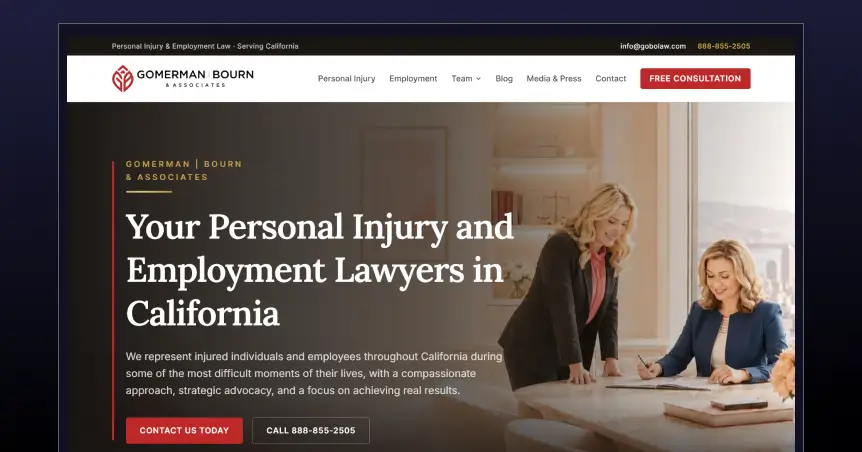
Gomerman | Bourn is a women-led California firm handling personal injury and employment cases.
What stands out is the credibility wall right under the hero: Super Lawyers, Multi-Million Dollar Advocates Forum, ABOTA, and a Yelp badge, stacked together instead of scattered through the site. This works because it front-loads proof before asking for anything.
What other firms can copy: pair a clear identity statement, in this case "women-led trial lawyers," with a six-step "how your case moves forward" timeline so a nervous visitor can see the whole path before they ever call.
How much does an attorney website cost? Get detailed pricing of web design, development, and monthly cost breakdown now.
2. Ray Pearson Law
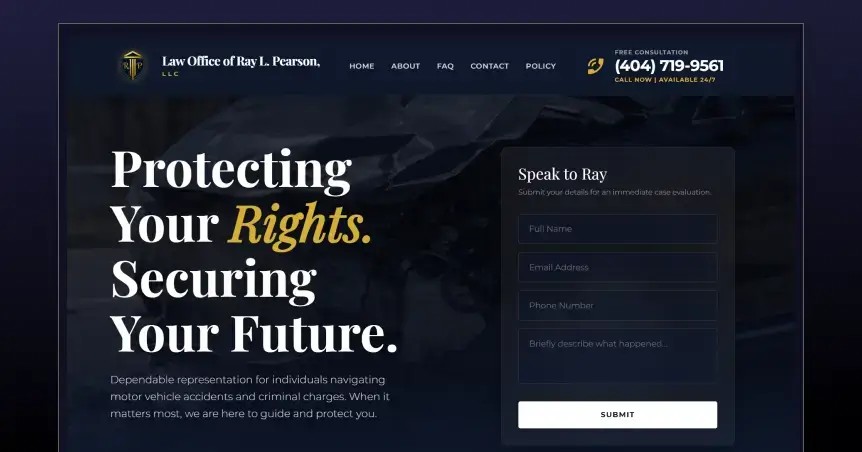
This is a solo Atlanta attorney's site, and it's built like one.
A background video plays behind the hero, and right next to it sits a two-field "Speak to Ray" form, not a button that sends you somewhere else. That's the smart part.
It shrinks the distance between "I'm interested" and "I've made contact" down to a few seconds. Small firms with one attorney can copy this directly: put a mini contact form in the hero itself instead of hiding it behind a nav link.
3. The Weinstein Firm
.jpg)
Weinstein has built out dozens of city and practice-area pages across metro Atlanta, from MARTA accidents to negligent security.
Why it works: instead of one generic "personal injury" page trying to rank for everything, each page targets one real, searched scenario.
The site also runs a settlement calculator and video testimonials instead of only text quotes. The lesson for growing firms: local SEO scale isn't about more pages for the sake of it; it's about a dedicated page for every specific way someone in your area actually gets hurt.
So, how much should you spend on SEO when launching a new law firm website? Read out now.
4. Butler Kahn
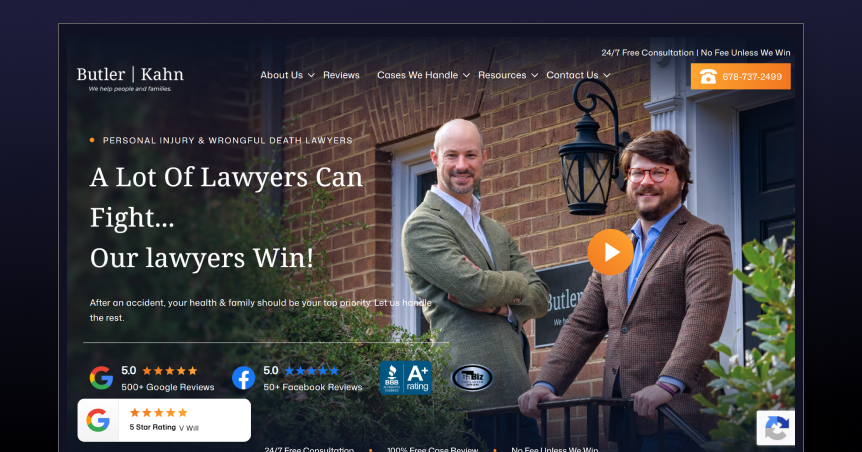
Butler Kahn does something almost nobody else in this list does.
Their homepage design and copy actively talk people out of hiring them if they want a volume firm: "If you want a law firm to assign your case a number... don't hire us."
That's a bold move, and it works because it turns selectivity into the trust signal. Paired with real verdict numbers like a $150 million wrongful death case, the contrarian voice reads as confidence.
Firms with strong results and limited capacity can borrow this: don't be afraid to say who you're not for.
[[inner-cta]]
5. Ellis Law Firm
.webp)
Willie Ellis spent sixteen years working for insurance companies before switching sides, and the whole site is built around that pivot.
The hero doesn't open with a tagline about fighting for justice. It opens with an iceberg: "The real strength of your case is beneath the surface."
That's a sharper way to say the same thing every PI site claims, and it's backed by a simple three-step "how it works" section right underneath.
The takeaway here: a single strong metaphor tied to a genuine credential beats five generic value props.
6. The Weinsten Firm
The Weinsten Firm is a national brand, and their Atlanta page shows what that looks like done right instead of lazily. The page is built for one metro with local practice-area links, a bilingual Español option in the main nav, and a media trust bar from NBC, CNN, and Bloomberg. What smaller firms can take from this: even a single-location site benefits from treating every local page like its own small homepage, not an afterthought bolted onto a national template.
7. Atlanta Accident Lawyers
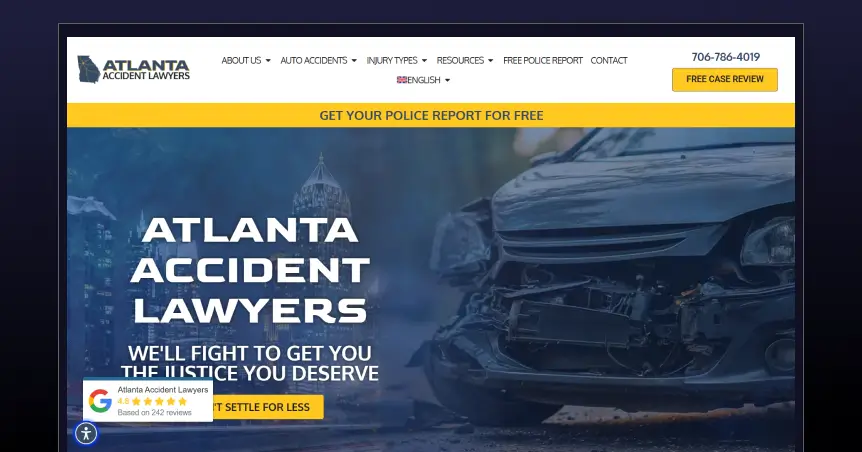
Most PI sites ask for a phone number before giving anything back. Atlanta Accident Lawyers flips that with a free police report lookup tool, offered before the pitch.
It's a small thing, but it's a real reason to visit the site even if someone isn't ready to call a lawyer yet. That's a smarter first touch than another "free consultation" banner, because it gives value up front instead of just asking for one.
Living in Atlanta and concerned about how to build a personal injury website design on a budget?
Get details and a guide on how much a personal injury website costs in Atlanta.
8. Danni J Law

Danni J. Law handles both personal injury and criminal defense, including DUI, gang crimes, and domestic violence, on the same homepage as their PI practice. The writing is warm, and the attorney bio is genuine, but the mixed positioning muddies the message.
A visitor with a car accident case lands on one that covers felony defense. The lesson: crossover practice areas need separate paths, not one shared homepage trying to speak to two very different kinds of visitors at once.
Personal Injury Lawyer Website Design Features That Actually Matter
Not every feature on this list earns its place. Here's what actually moves the needle:
- A hero section that names the outcome, not just the action
- Click-to-call and a short intake form, both visible without scrolling on mobile
- Real case results with context, not floating numbers
- Practice-area pages built around specific scenarios, not one catch-all page
- A trust signal that's specific to the firm, not a generic badge everyone has
- A tool or resource offered before the ask, like a settlement calculator or a police report lookup
Skip the rest. Sliders, autoplay carousels, and stock photography don't move a scared, injured visitor any closer to picking up the phone.
Look out what personal injury lawyers follow in the web design trend in Atlanta
How to Build a Personal Injury Law Firm Website That Converts
Most firms hire out website design for personal injury lawyers and still end up with a template. Here's the actual framework, not the template.
- Define the one thing your firm is known for, whether that's trial experience, a specific case type, or personal attention.
- Build the homepage around what an injured visitor needs first, not around your firm's history.
- Create separate, focused pages for each major case type rather than one page that tries to rank for everything.
- Add real proof: case results with context, attorney photos, and specific credentials.
- Make contacting the firm take seconds, especially on mobile
- Optimize for the phone visitor first, then adapt up to desktop
- Build local SEO into the page structure itself, not as an afterthought
- Track what visitors actually do on the site, and fix whatever step loses the most people
Final Takeaway
A great personal injury website isn't the one with the most animations or the biggest hero image. It's the one that makes a hurt, worried visitor think this firm gets my situation, and I know exactly what to do next.
That's harder to build than it sounds. It takes clear positioning, real proof, and a site built around trust instead of decoration. If your current website is asking visitors to work for that clarity instead of handing it to them, that's usually where the leads are quietly leaking out.
That's the exact gap LegalPeel builds law firm websites to close. If you want a second opinion on where yours might be losing consultations, we're happy to take a look.
[[last-cta]]

